Instagram remains one of the most popular photo-sharing platforms in the world. On the platform, users can share their photos & videos and gain followers.
The shared photos & videos automatically appear on the Instagram profile grid. However, one feature that was missing until now was the ability to manually reorder posts on the profile grid.
Now it looks like Instagram listened to the users and brought the ability to reorder posts on the profile grid manually.
How to Rearrange your Photos grid
There’s a new option on the app that lets you manually reorder your posts on your profile grid. To use this feature, follow these simple steps.
1. Open the Google Play Store or Apple App Store and update the Instagram app.
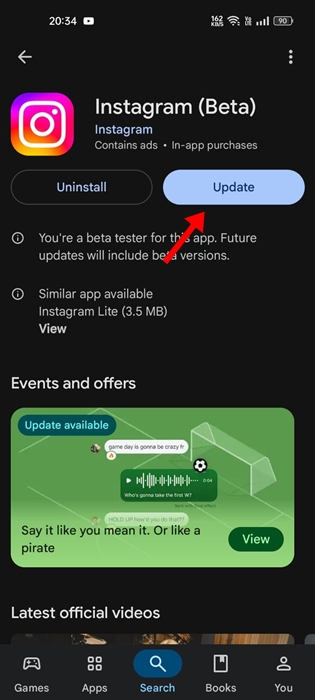
2. Once updated, launch the app and go to your profile grid.
3. To reorder the images, long-press any of your images.
4. Next, select Reorder grid.
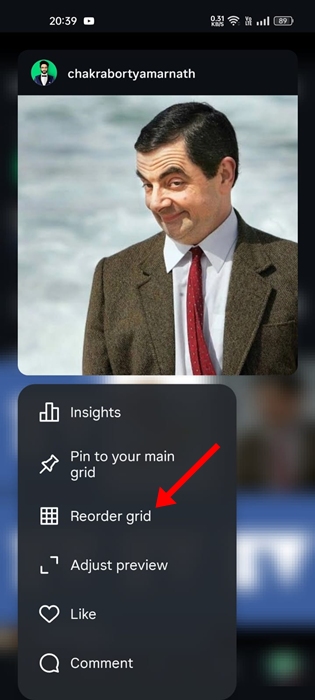
5. Now you can drag and rearrange your photos in whatever order you’d like.
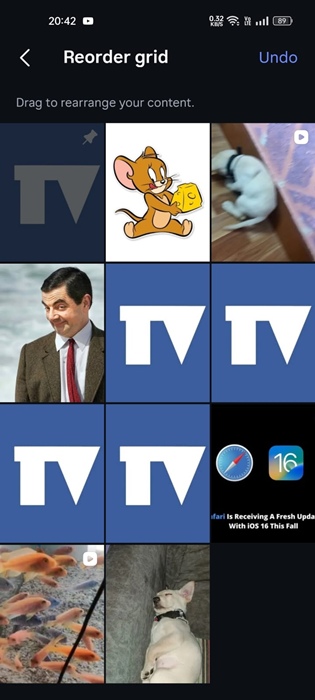
6. Once you’re done, tap the back chevron in the top left corner.
The changes will be instantly applied to your actual profile.
The feature is not available?
Instagram said that the feature is ‘available starting this week’. This means that not every user will have access to it yet. It may take a few weeks to reach every user.
This guide explains how to rearrange your photo grid on Instagram. If you need more help on this topic, let us know in the comments