
Gmail is possibly the best and most popular email service out there. Everyone, including students to businesses, uses the free email service.
If you rely on Gmail to send and receive emails, you may know the importance of Undo sent email options.
Sometimes you can accidentally send a mail to the wrong email address, or you may want to make some corrections in the email; at that time, having the option to undo the sent email could be very helpful.
Steps to Undo Sent Email In Your Gmail Account
Hence, below we have shared a guide where we have mentioned steps to enable the Undo Sent email in your Gmail account. Let’s get started.
1. First, log into your Gmail account in which you want to cancel the mail. Now at the top right corner, you will see a Settings option. Just click on it.
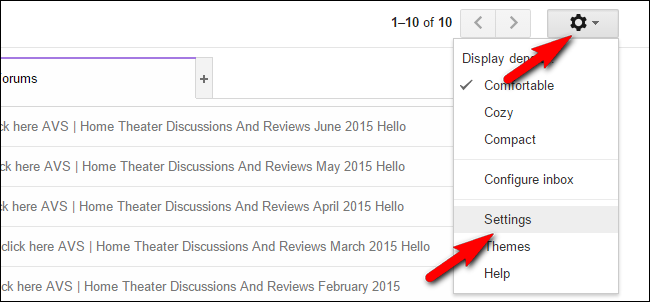 2. Now under the General tab, you will find an option to Enable Undo Send.
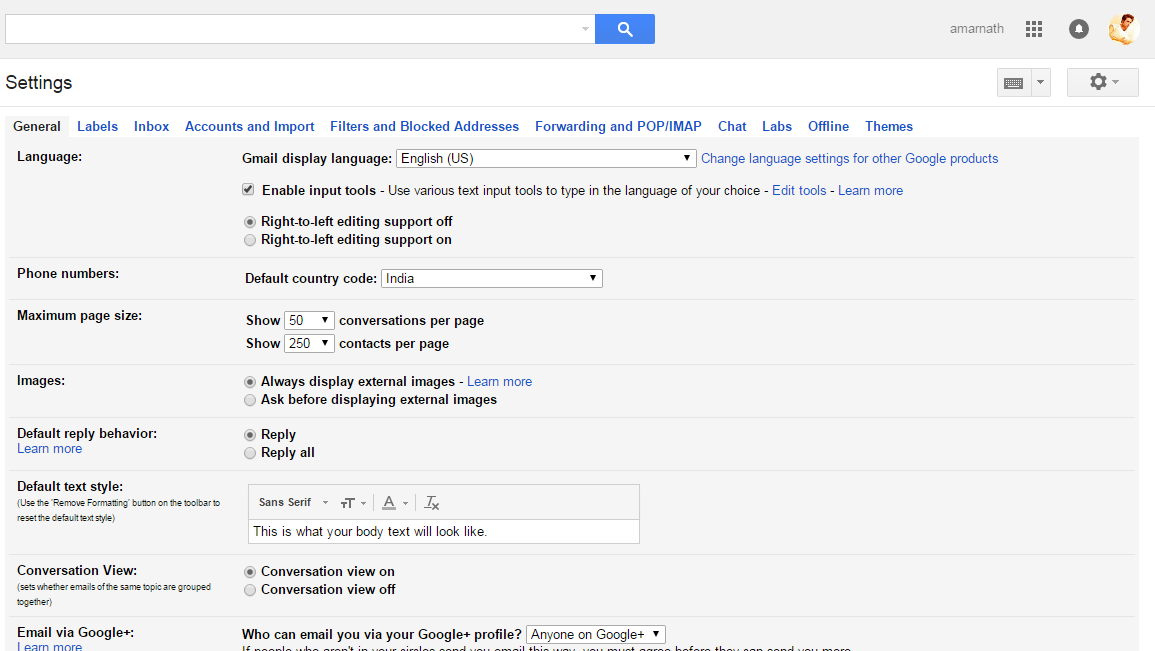 3. You just need to select the option of Enable Undo Send. Once enabled, set the time frame in the Send cancellation period.
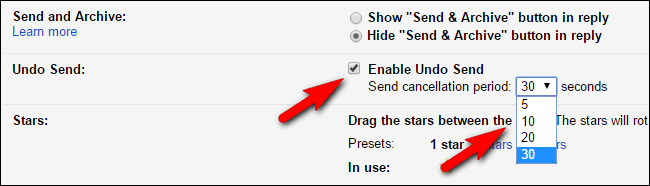 4. After you have set your time limit, you need to save these changes. That’s it every time you send the mail; you will be given an option of 10-30 seconds to undo the sent email.

So, this is how you can undo sent emails in your Gmail account. If you need more help recalling the emails sent in Gmail, let us know in the comments. Also, if the article helped you, make sure to share it with your friends as well.


Pls how can i reset my gmail account bcause of lose a passward
Hey Ibrahim,
Try to forget by phone number. 🙂