WhatsApp has already proven its value in our daily lives. If you live in India, you can already use the app to recharge your phones, book metro tickets across cities, etc. Now WhatsApp has announced Bill Payments in India.
How do Bill Payments work?
With the Bill Payments feature, WhatsApp plans to make it easier for people to find, manage, and pay their everyday household and utility bills.
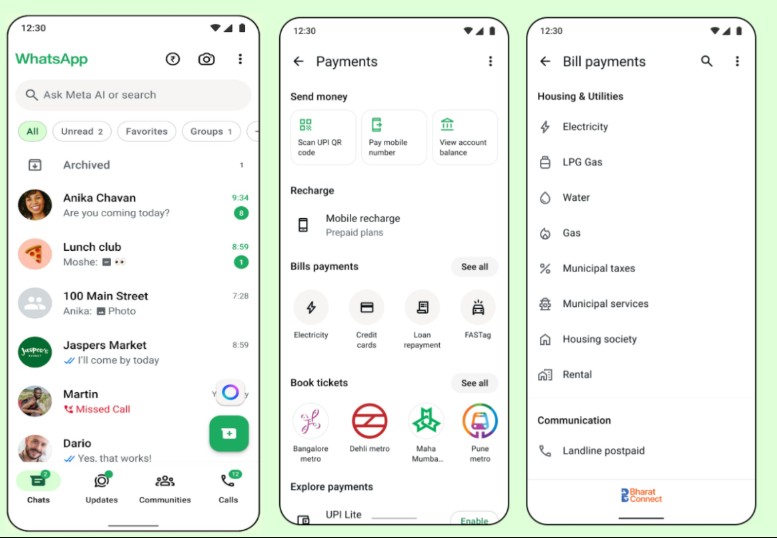
All these things can be done within WhatsApp. The Bill Payments feature is powered by the Bharat Connect Network (BBPS), which gives access to over 22,722 billers across 30 different categories.
Basically, with WhatsApp, users in India can now pay their electricity, gas, water, and FASTag bills. You can also pay insurance premiums and make credit card and loan repayments.
WhatsApp will also let you view past payments and upcoming bills and manage multiple accounts under a single provider.
How to Access and Use Bill Payments in WhatsApp?
Bill payments are gradually rolling out to every user in India. So, it may take a few days or even a week to reach your phone. You can check if Bill Payments is available to you by following these steps.
1. Update the WhatsApp app on your Android or iPhone.
2. Open the WhatsApp app and tap the ₹ icon at the top of the home screen.
3. Select the bill category and biller.
4. Add and confirm your bank account details.
5. Review the bill amount and required details.
6. Select the Payment mode and confirm the payment.
The most used bill categories will show up on the Payments page automatically. There’s also a ‘See All’ option to browse the full list of categories.
This guide explains how to use WhatsApp to pay everyday household bills directly on WhatsApp. If you need more help setting up Bill Payments on WhatsApp, let us know in the comments.