Avast SafePrice is a free browser extension that maintains a database of trusted e-shops. It’s designed to help you save money as you shop online and on travel sites.
When you visit an e-commerce website or shopping site, the Avast SafePrice extension checks for all available best offers, deals, and discount coupons.
It will let you know if it finds an available coupon or offer. So, if you are an online shopper, you should use the Avast SafePrice Add-on.
How to use Avast SafePrice?
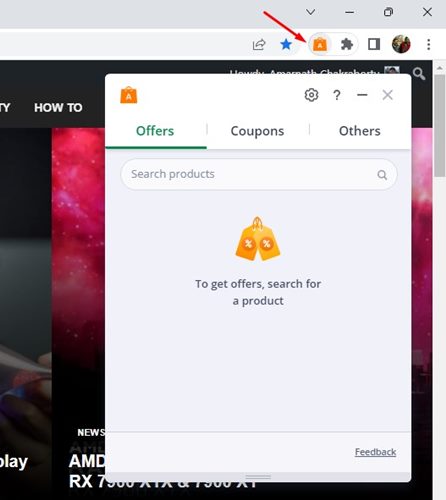
The Avast SafePrice browser extension is pretty easy to use. Once installed and enabled, it runs automatically in the background.
It effectively scans your shopping site for all available coupons and deals. If it finds any, it displays pop-up notifications.
If a coupon code is available for the product you are viewing on the shopping site, you can apply a Coupon directly.
Is Avast SafePrice a Virus?

If you have just installed Avast Antivirus on your device, you will see the Avast SafePrice extension.
As far as the question is concerned, ‘Is Avast SafePrice a virus?’ No, it’s not. It’s a part of a security suite. Hence, it’s not a virus or malware. You can use it without worrying about any privacy or security issues.
Does Avast SafePrice Collect My Data?
This is one of the most important questions you should ask yourself before making any decisions. Avast SafePrice is meant to find the best prices and coupons from a database of trusted e-shops.
To display the offers, Avast collects anonymous data about the pages and products you visit. On its official site, Avast states that the data Avast SafePrice collects is not connected to your data.
How to Remove Avast SafePrice
There are multiple ways to remove Avast SafePrice from a computer. Here are some of them.
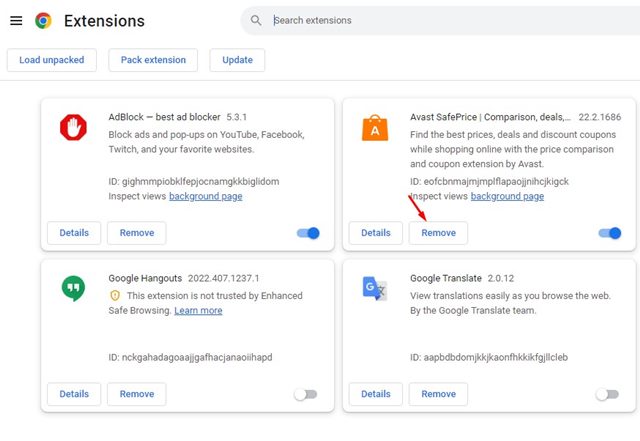
1. To remove Avast SafePrice, click on the three dots on your Chrome and select More Tools > Extensions.
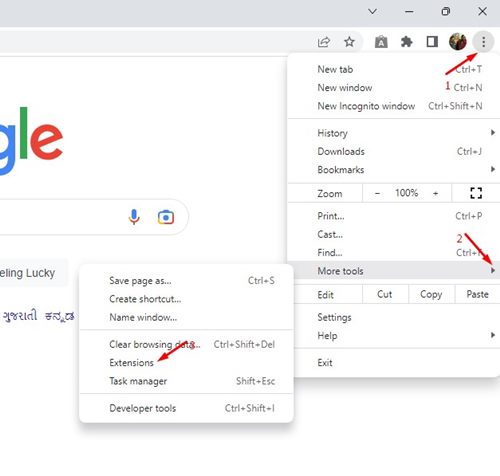
2. This will open the Extension page on your computer.
3. Click the Remove button underneath the extension name.
Remove Avast SafePrice from the Avast Antivirus Interface
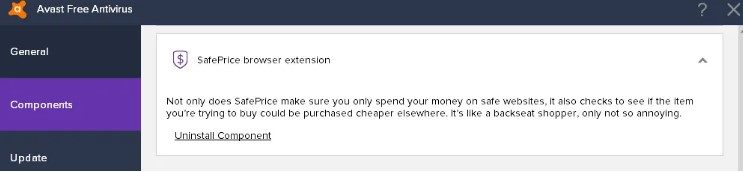
If you are using a very old version of Avast Antivirus, you must remove it from the Avast Antivirus Interface. Open Avast Antivirus and navigate to Settings > Components.
On the Components, scroll down to the SafePrice browser extension and click Uninstall Component.
Uninstall Avast SafePrice from the Control Panel
To remove the Avast SafePrice browser extension, you need to change the Avast Antivirus setup file in the Control Panel.
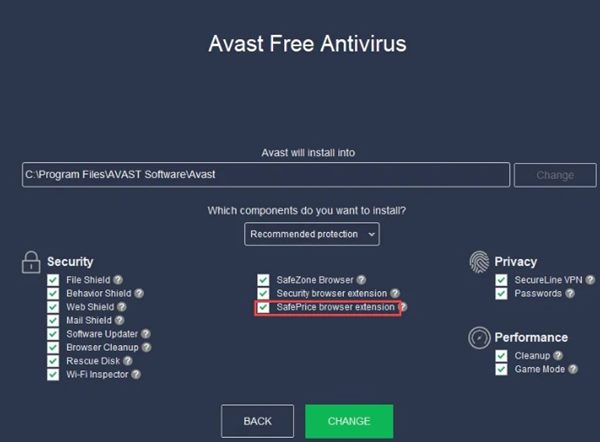
- Open the Control Panel from the Windows Search.
- Click Programs and Features.
- Right-click on the Avast Antivirus and select Change.
- Uncheck the SafePrice Browser Extension and click Change.
Wait a few seconds for Avast Antivirus to change your system. This will remove Avast SafePrice from your computer.
Also read: How to Remove Malware from PC Using Google Chrome
This guide covers Avast SafePrice and how to remove it from your computer. If you need more help, let us know in the comments below.